Security notice (21 October 2026): VivaDesigner, VivaDesigner Server and VivaCloud are not affected by the PHP vulnerabilities CVE-2026-109618 and CVE-2026-109619. These vulnerabilities only affect PHP installations that handle web requests themselves. VivaCloud does not use PHP for this, and VivaDesigner Server handles web requests itself. Nevertheless, please always install the updates we provide promptly.
Viva AI

The revolutionarily simple AI approach

VIVA AI revolutionizes the use of AI by guiding users through pre-defined tasks. As a business or developer, you can define any tasks and parameters to increase user efficiency and quality of answers.

Write, rephrase and translate texts, convert them to speech and edit images, directly in VivaDesigner and without switching programs.

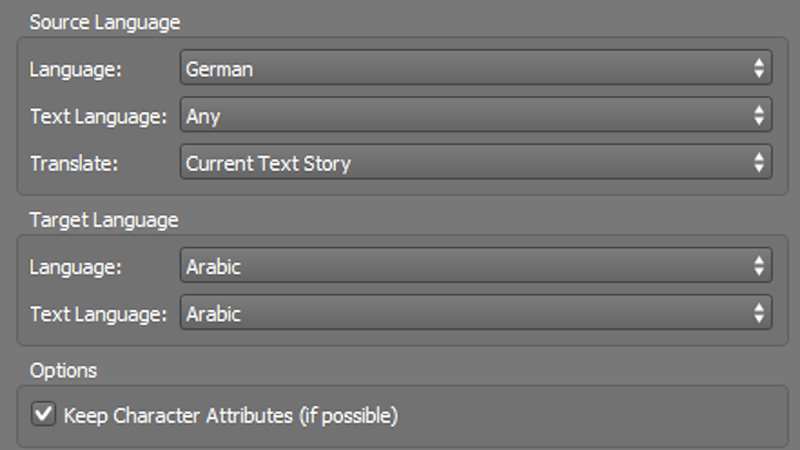
Translate your text into over 30 languages
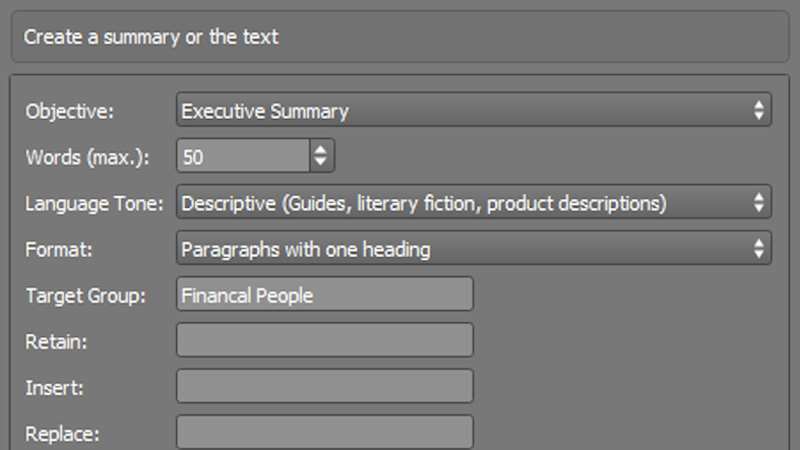
Summarize your text with VIVA AI
VIVA-AI-Composing

Create and edit texts with AI

Select a text frame, choose an AI action and set the options. The result goes straight into your layout.

AI actions for texts:

    • Create articles → objective, topic, length, tone and target group
    • Headlines → several variants with your keywords
    • Keywords → by criteria, number, order and purpose
    • Rephrasing → simpler, shorter or longer; keep, insert or replace terms
    • Summaries → executive summary, product description or press release
    • Find problems → contradictions or content unsuitable for children
    • Questions about the text → answers taken from the text, or quiz questions
    • Extract data → names of people, companies, places and events

Translate documents automatically

Texts, layers or complete documents in over 30 languages, in a matter of seconds.

Your advantages:

    • Layout stays intact → no export, no copying between programs
    • Typography is retained → character attributes on whole words are carried over
    • Over 30 languages → including Arabic, Chinese, Japanese and Korean
    • Multilingual documents → one layer per language, lockable with a password
    • Split window → check source and translation side by side
    • Lower costs → far cheaper than a complete manual translation

Convert text to speech

Export a text or the whole document as an MP3 file, with male or female voices in many languages.

Three technologies:

    • Standard → clear and understandable, for simple applications
    • Neural → natural, human-sounding voices with emotion and nuance
    • Generative → expressive and colloquial, remarkably close to the human voice

Typical applications:

    • Audiobooks
    • Accessible documents for visually impaired and blind people
    • E-learning materials that are read aloud
    • Dubbing of marketing and advertising materials
    • Presentations and videos with voice-over

Edit images with AI

Remove backgrounds, elements and text, extend images or increase their resolution, directly in the picture box.

AI options for images:

    • Remove or blur background → as a mask; the original image stays unchanged
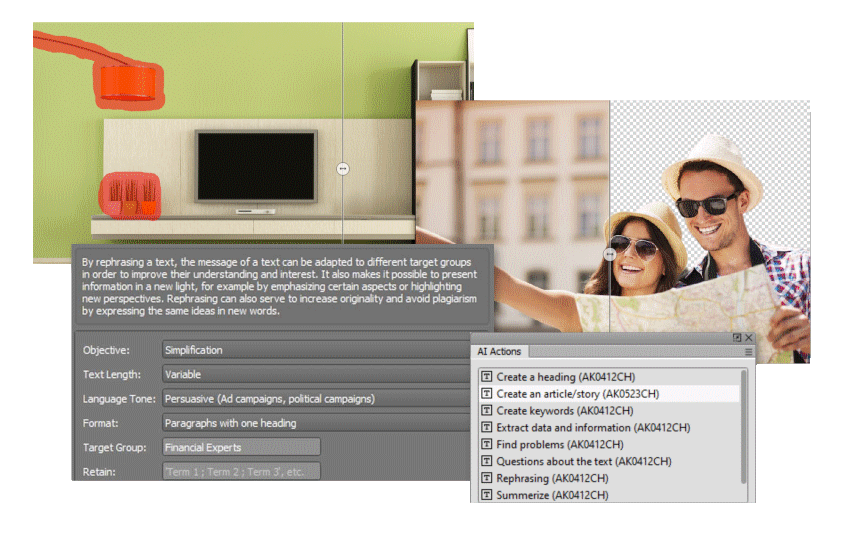
    • Remove elements → mark them with the brush, the AI fills the area
    • Replace elements → mark the area and describe the new content
    • Generative fill → extend the image to the left, right, top or bottom
    • Enhance resolution → up to 4,000 pixels
    • Remove text → removes lettering from photos
    • Describe images → generates descriptions, e.g. for captions
Living room with marked objects
Living room with the objects removed

Remove elements before · after

Woman with a knitted cap
Same woman with a blue cap

Replace elements: “Woman with a blue cap” before · after

Portrait, original crop
Portrait extended with generative fill

Generative fill before · after

Station hall with the words London Calling
Station hall without lettering

Remove text before · after

Advantages for companies and developers

VIVA AI is built into VivaDesigner and billed transparently with VIVA Points.

    • Pre-defined tasks instead of free prompts, for consistent results
    • Customer-specific AI actions on your own server (Base URL)
    • Connection to your own systems via the Developer API
    • Free monthly quota, then pay-per-use with VIVA Points
    • The expected cost is shown before every calculation
    • Activation in line with the EU AI Act and your company’s AI literacy

AI results must always be checked. VIVA Points used are not refunded in the event of errors.

Developer API

Use the same AI actions as VivaDesigner in your own software, web shops and workflows. The VIVA Publishing Server provides them through an HTTP interface with JSON responses.

AI actions:

    • List AI actions → all available actions with their parameters, labels and help texts
    • Run AI action → the result, plus the costs in VIVA Points and a receipt
    • List AI voices → voices, languages and engines for the MP3 export

Texts and documents:

    • Translate text → up to 10,240 characters per request, source language detected automatically
    • Translate document → complete documents in one request
    • Analyze text → structure, classification and entities, or the similarity of two texts

This is how it works

Three steps from the list of actions to the result.

  1. Query the actions
    GET /{project}/api/ai/list/
    Each action comes with its parameters, so your application can build its own input form.
  2. Run an action
    POST /{project}/api/ai/{action-name}/
    Pass the parameters as form data, e.g. an image for “picture-signature”.
  3. Receive the result
    Text or file, the costs in VIVA Points and a receipt number for your accounting.

Example: translate a text

POST https://{server}/{project}/api/translate/
VDS-APIKEY: ••••••••
{
  "mode": "translation",
  "source_language": "detect",
  "target_language": "DE",
  "text": "Because of that, you need to be sure you’re making the right long-term choices for you."
}

Response
{
  "state": "success",
  "text": "Aus diesem Grund müssen Sie sicher sein, dass Sie langfristig die richtigen Entscheidungen für sich treffen.",
  "costs": "0.435",
  "receipt": "8c9498d4f007804232a94c7459314996"
}

Access and billing

    • Authentication with an API key in the header VDS-APIKEY, or with user name and password (HTTPS only)
    • Billing per request in VIVA Points; every response contains the costs and a receipt
    • The requests run on the VIVA Publishing Server, organized in projects

VIVA Newsletter