viva_logo-135x40

Flexible Data Import

VIVAPOSTERIZE can import all the relevant image formats, such as EPS, LAY, TIFF, CT, LW or also all PDF files (PDF Format 1.6).

Data already imported can be updated automatically when the original data is altered. In this way last minute changes of content are possible at any time.

VivaPosterize: Millions of posters. One program.

What is VivaPosterize?

VIVAPOSTERIZE is the leading tool for extremely fast automatic digital tiling and output of posters and billboards. Already on the market since 1999, the program has since then been setting new standards in speed, safety, flexibility and functionality.

Developed in co-operation with leading printers in offset and screen printing, VIVAPOSTERIZE is able to process documents with a speed and precision which has never before been achieved. It’s no wonder then that millions of posters and billboards are produced with VIVAPOSTERIZE every year. Our customers produce posters for local and international advertising campaigns of well known manufacturers as well in the food and drink, automobile, fashion, cosmetics, furniture, electronics and media industries as well as many other fields. Therefore you will surely at least once have seen a poster or billboard which has been produced by our software!

How does VivaPosterize work?

VIVA has from the very beginning followed a completely new and revolutionary path in electronic imposition. The starting point for the development was that our customers wanted to be able to manage the complex technology as simply as possible. Just three simple steps are necessary in the Workstation version of VIVAPOSTERIZE to process a job completely in just a few minutes: data import, poster tiling and output. Only one step is necessary in the Server version to complete a job in seconds: to transfer data to the server, which will complete the tiling and output fully automatically.

Import & Export of Adobe InDesign Files

You can open documents created with the layout program “Adobe InDesign” (hereinafter referred to as “InDesign”) directly in the program.

Please read the section “Opening Abobe InDesign documents” in the manual.

The following InDesign formats are supported:

Format Designation Brief description
INDD InDesign Document The native standard document format for Adobe InDesign. Contains layout, text, images, styles, and metadata. The format can be opened directly in the program via File > Open.
IDML InDesign Markup Language XML-based exchange format. Used for version compatibility (older versions of InDesign). The format can be opened directly in the program via File > Open.
INDT InDesign Template Template file for InDesign. Contains predefined layouts and styles that can be used as a starting point for new documents. The format can be opened directly in the program via File > Open.
IDMS InDesign Snippet Individual layout elements or objects (e.g., text or image frames, groups) can be saved as snippets and inserted into other documents. The format can be inserted into document pages directly in the program via File > Import.
ICML InCopy Markup Language XML-based exchange format for Adobe InCopy. Used to allow editors to edit text independently of the layout. The format can be imported directly into text objects in the program via File > Import.
ZIP Zigzag Inline Package ZIP archives are not an InDesign format, but a general compression format. You can save an InDesign document (e.g., in INDD or IDML format) together with images and fonts as a ZIP file. The format can be opened directly in the program via File > Open (including resources). Please note the information in the section “Opening ZIP archives”.

To do this, the program converts the document into its own format so that they are saved in their own format when you save them. Depending on the edition, the program can also export documents in InDesign format. Please refer to the corresponding section Export InDesign document.

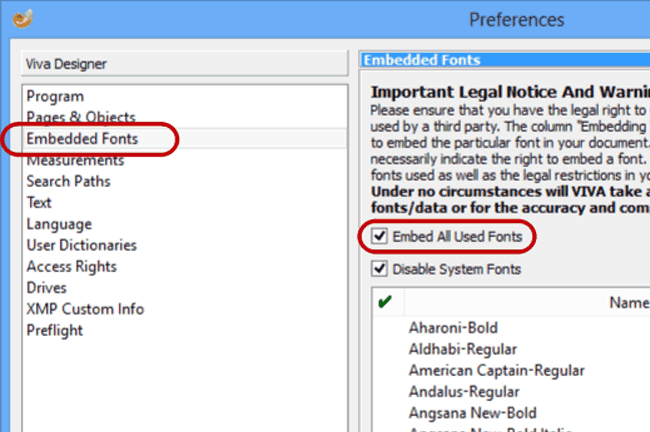
Font Embedding

A huge problem in the exchange of documents is the distribution and handling of fonts:

  • Many users do not want to share their fonts.
  • In many cases, fonts cannot be installed without Administrator rights.
  • Additionally installed fonts frequently clash with fonts that are already installed.

With VivaDesigner, all these problems may be solved with a mouse click by automatically embedding all the fonts used in the document.

International co-operation

VivaDesigner was specially developed for the creation of multilingual documents and international document exchange:
1. Editing of ALL languages AND writing directions in one single uniform application and document format (incl. Arabic, Hebrew, Chinese, Japanese, Korean).
2.Multilingual user interface in about 20 languages, which can be switched on the fly.
3. Standard colors and Style Sheets are optionally translated automatically according to the selected language. In this way, just one single document can be passed to users with different languages for editing. With this technology, companies, agencies, printers or service providers can create document “templates” that are understood immediately in every country.

Team Publishing with VivaDesigner

With the “Team Publishing” module, VivaDesigner can be extended with task functions as in an editing system.

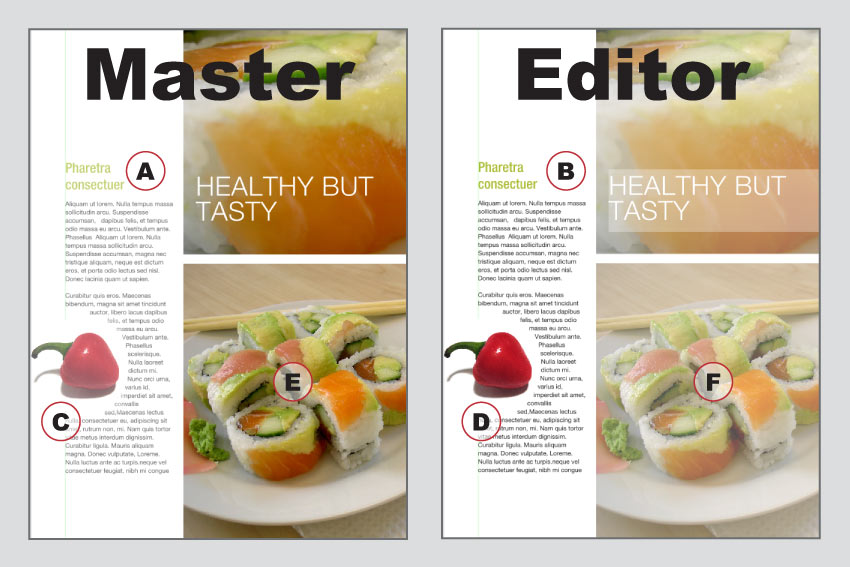
With the “Team Publishing” module, editing systems may be created simply and quickly in which several people work simultaneously on one document. In the development of the module, the requirements of both larger and smaller publishers were considered.

Benefits overview:

 
  • The editor can not only re-edit text, but on requirement can also edit images or frames.
 
  • The editor receives a preview of all the frames on the page, even if he can’t edit all the frames and their content. Thus the editor knows the exact content of the page.
 
  • The editor even gets an update of the changes that others have made in the document, providing there is a network connection to the master document.
 
  • Especially with small publishers, the editor is also the designer and thus is responsible for parts or even for the entire page.
 
  • To use the software, a server is to be recommended on which all concerned will work centrally, but this is not a condition of use. It is particularly useful for editors whose offices are separated from one another. In this case, the creator of the task files can also send them by E-Mail.


The module is therefore not only suited for editors in the production of magazines or newspapers, but also for corporate publications where several users work on different sections. Designers can work in parallel to change the design, while the users fill the frame with images or text. Like all modules, “Team Publishing” too can be applied in the Desktop and Web versions.

Distributed Publishing with VivaDesigner


Do you still work with traditional layout programs, word processing, PDF, E-Mail, FTP, CMS, publishing systems, photo book or “Web-to-Print” software to organize your publishing processes?

With “Distributed Publishing” VivaDesigner offers you a completely new, simple, safe and above all affordable solution for communication between media service providers and your customers or colleagues!

What exactly is “Distributed Publishing”?

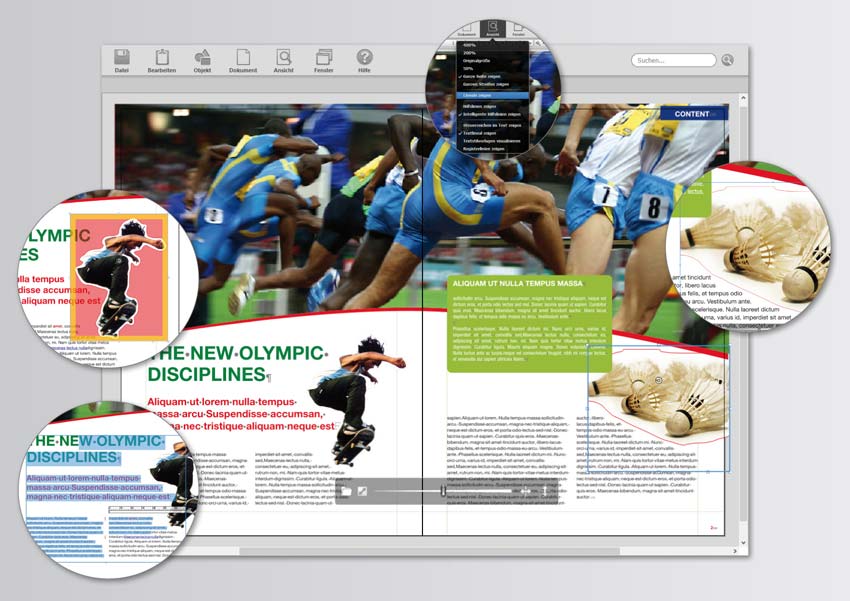
Based on VivaDesigner, “Distributed Publishing” is a technology with which media service providers prepare and provide an open layout document to their customers, colleagues or employees. The editing rights that a user may have can be defined individually for every document.

You can for example create documents that only give other users the possibility of entering text or moving images. Colors or Style sheets are available to these users but may not be edited by them. As the creator and administrator you protect your documents with an individual password, and you can release the documents for further editing with this password. In Web you can even do without passwords and assign the user rights on a role basis. In addition, individual layers or Alias (Master) pages may be protected from prohibited access or changes. In this way the user can for example enter text with fixed hyphenation rules straight into the layout. Documents to which access rights have beeen assigned can be opened in every program edition. On the desktop the completed documents are despatched fully automatically, without using Email, FTP, or Web applications. Like all modules, “Distributed Publishing” can be used in both the desktop and Web versions.

How does “Distributed Publishing” work on the desktop and in the Web?

In just six steps to the perfect document: With “Distributed Publishing” you create a template that can be edited and sent back automatically by a user in just a few minutes.

Step 1: Create template

Create a layout im VivaDesigner or import a completed layout from Adobe® InDesign® in IDML format (from CS4).

Step 2: Define access rights

Define the editing rights from over 30 settings for text and images, as well as program, layout and printing options, that you would like to give to the user. Protect these settings with an individual password. As an option, move single text/picture objects to password-protected layers to protect them from being accessed by the user.

Step 3: Deliver the document to the customer or upload it to the Web

Provide the document to the customer (e.g. as a download or for direct editing in the Web).

Step 4: Customer edits the document

Your customer edits the document within the user rights assigned to him locally on his own computer using either the desktop or Web version.

Step 5: Automatic document return in the desktop version

VivaDesigner sends the completed document to a predefined address fully automatically with all fonts and images and sends you a confirmation message with all the required information.

Step 6: Further editing

Unlock the document with your password for further editing, which may follow automatically in the Web. As an option, any application software can automatically edit the data further (e. g. for a proofing or order process or direct printing).

When do I need VivaDesigner with “Distributed Publishing”?

You need “Distributed Publishing” as an optional extension to or replacement for your layout program if according to your user group you can answer one or two of the goals listed below with Yes.

Goals for designers/service providers:

  • You receive from your customers/colleagues text or word processor files, PDFs, faxes, E-Mails and want to put an end to this flood of data and manual tasks?
  • You want to save the costs for an editing system or a »Web-to-Print« solution, because these are too expensive and/or are not suited for small print runs?
  • You want to keep full control over the document even with small print runs and still offer your customers extensive freedom of content?
  • You want to ensure that the customer does not move to other suppliers with your templates?
  • You need a solution that gives your customers and their partners world-wide the possibility of translating into ALL languages without changing your design?
  • You want ONE software without any language exceptions? For Russian, Chinese, Japanese, Hebrew and Arabic?

Goals for companies/end users:

  • You want to enter your text straight into the final layout, instead of writing in text or word processing programs or E-Mail programs?
  • You want to define image cropping and image size directly in the final layout, instead of describing your requirements in great detail to the graphic designer?
  • You don’t want to make proofing corrections in PDFs or send text by E-Mail any more?
  • You want a user interface with a genuine print preview (WYSIWYG) that is simpler than “MS-Word®”?
  • You don’t want to be obliged to buy the layout software of your graphic designer including all updates and upgrades?
  • You don’t want to exchange data constantly with the graphic designer until both parties are satisfied?
  • You want to provide your overseas partners in the Middle East or Asia with documents in your CD and the relevant translations? You want ONE software for all languages, NO exceptions?

Try out “Distributed Publishing” with VivaDesigner free of charge. Have a look at the video, download and install the 30 day demo version. Please read the instructions and feel free to contact our Support free of charge.

{youtube}j4T1VG1xYlw{/youtube}This video demonstrates how easy it is to edit InDesign/VivaDesigner documents in the Web (VivaCloud).